Windows download available - current release v1.2.28

Automated market making
for Chia CAT tokens.

Set up your bid/ask ladder, pick your spread, and let it run. CATalyst keeps your offers on the book, requotes when price moves, snipes arb gaps, and tightens toward the safest edge, all from a Sage wallet on your own machine.

Public beta

CATalyst is still beta software. We are actively looking for tester feedback, bug reports, and crash logs in the public bot repo so we can harden it before wider release.

Free to use Local-only · keys stay in Sage Built on Dexie & TibetSwap
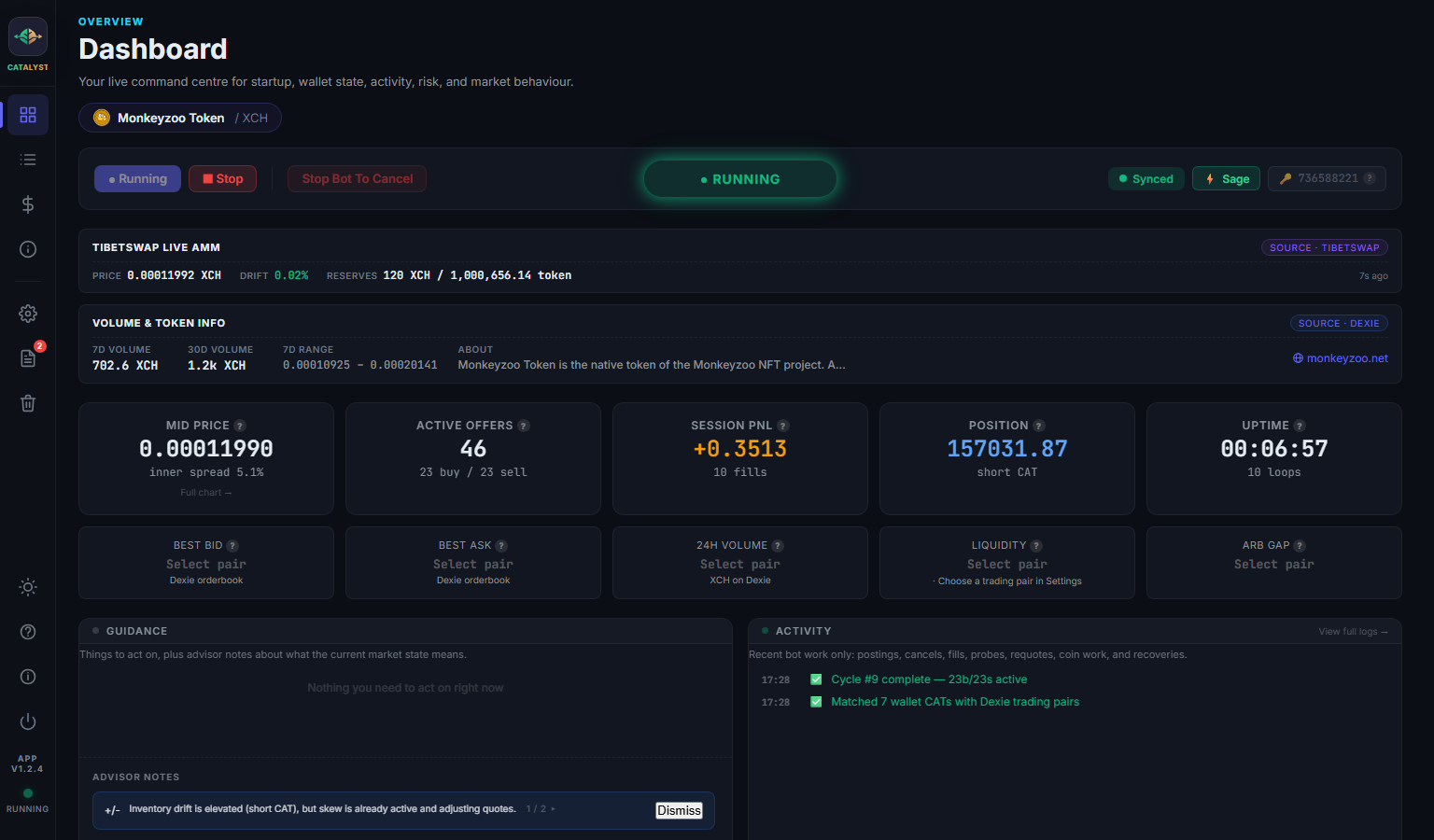
CATalyst · Dashboard · current beta
CATalyst dashboard showing live market making session
4 tiers
Inner · Mid · Outer · Extreme
~12 s
Mempool fill detection
2 venues
Dexie + TibetSwap pricing
Local
Keys stay in Sage
Why CATalyst

Built for the Chia CAT market, not retrofitted.

Every piece is wired around how Chia actually works: UTXO coins, mempool flow, and pool-aware pricing across Dexie and TibetSwap.

01
A real ladder, always on the book
Tiered offers around mid-price, larger inside, smaller outside. Auto-requote when price drifts past your threshold. Pre-emptive refresh before offers expire.
02
Aware of the pool, not just the book
Dynamic spreads adapt to volatility, depth, fill rate, and competitor positioning. The Arb Sniper fires probes when Dexie and TibetSwap diverge.
03
Yours, on your hardware
Talks to Sage Wallet over local RPC. No telemetry, no cloud, no custody. Closes to your system tray and keeps trading without a window open.
Inside the app

A trading desk you can actually read.

Five core views: Dashboard, Offers, P&L, Market Intel, and Settings. Each tuned for a single job. No tab clutter, no screen-of-numbers.

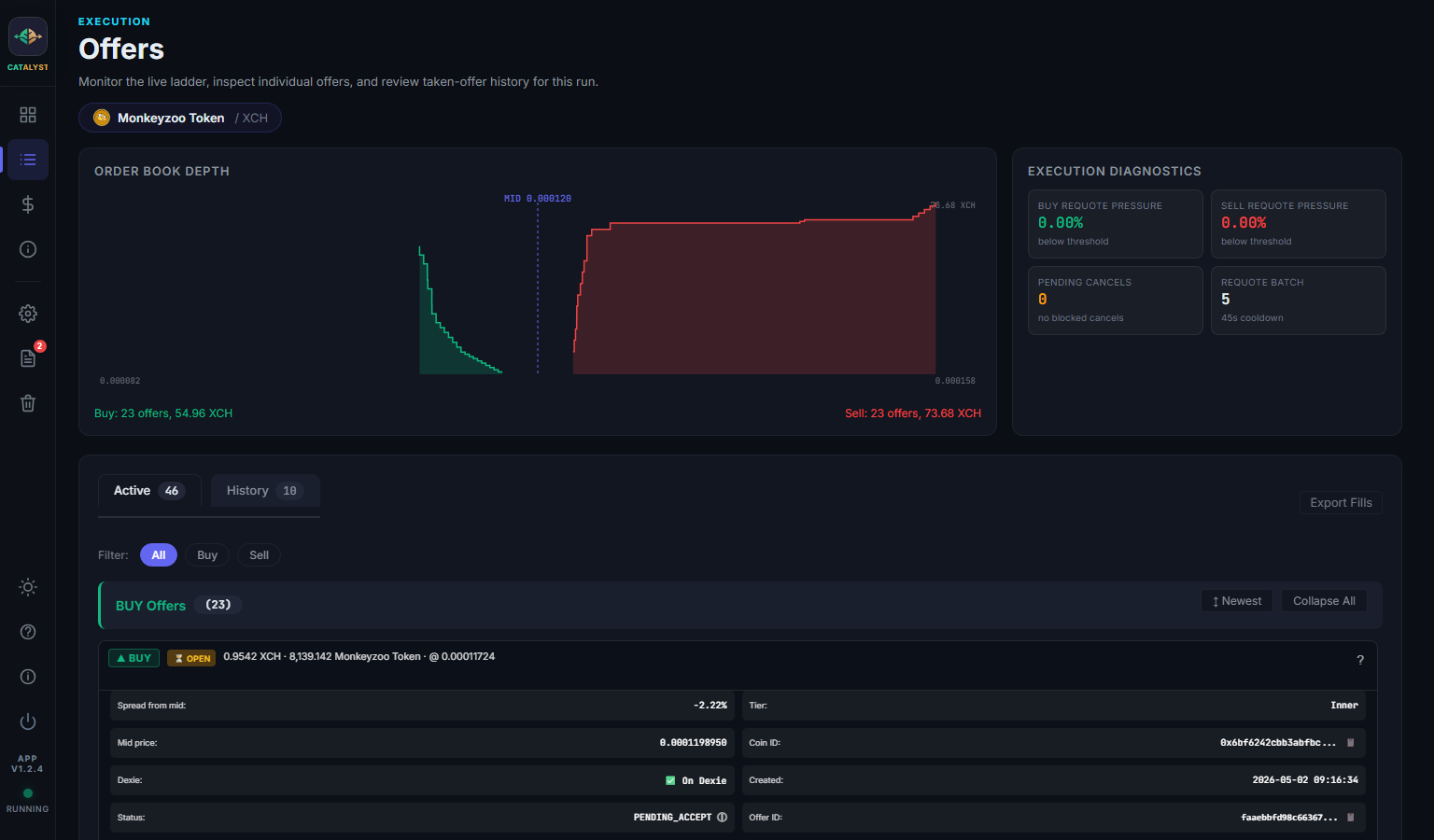
Offers view: order book depth chart and active offer cards
OFFERS
See your ladder, side by side with the book.

The depth chart shows your buys and sells against mid-price. Each offer card lists tier, spread, coin ID, Dexie status, and a one-click link to the live offer.

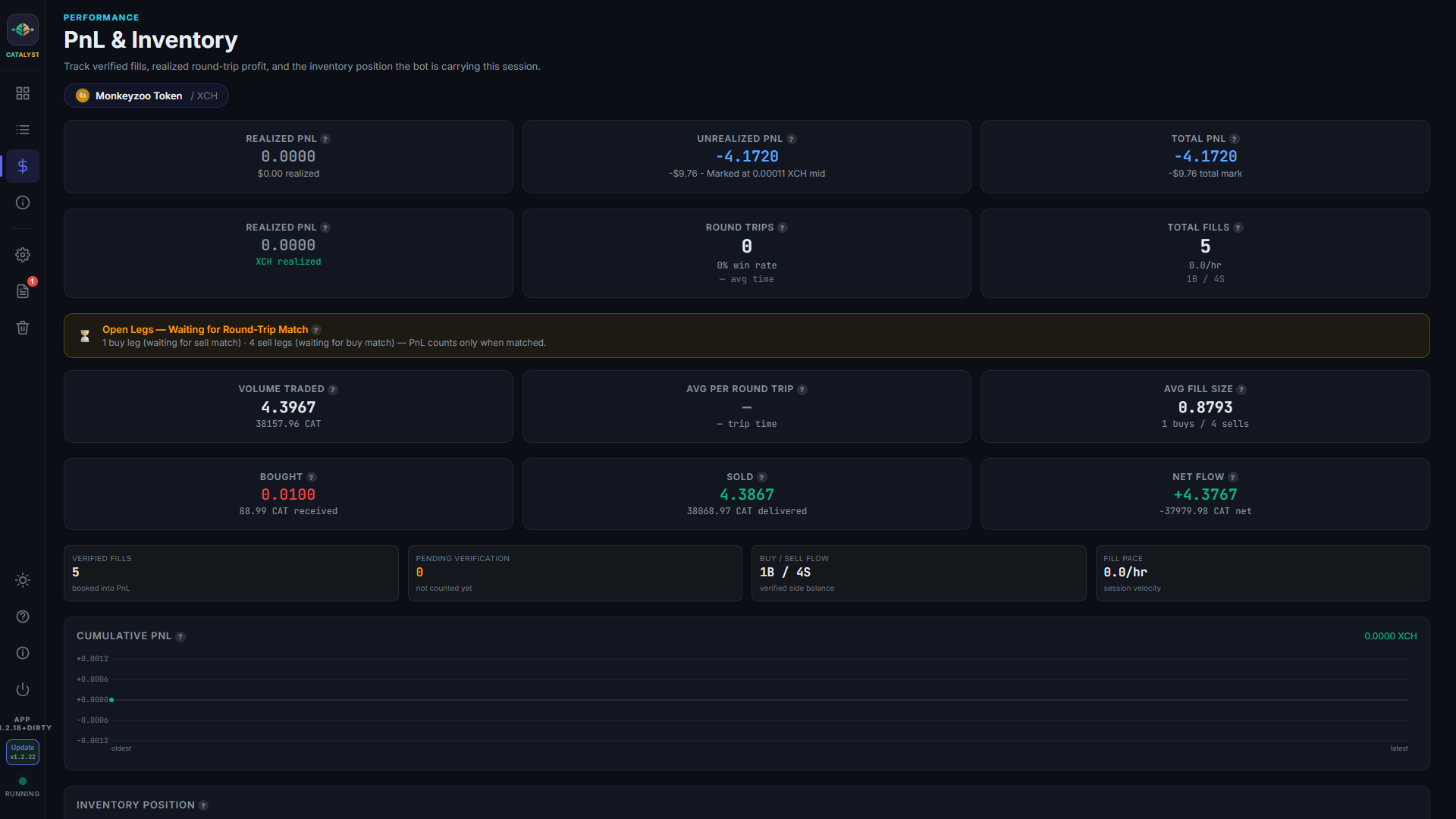
P&L view: cumulative profit chart and inventory position
P&L & INVENTORY
Round-trip matching, not vanity metrics.

Realised PnL pairs buy fills with sells of similar size. Net position, drift, and unmatched legs are all visible.

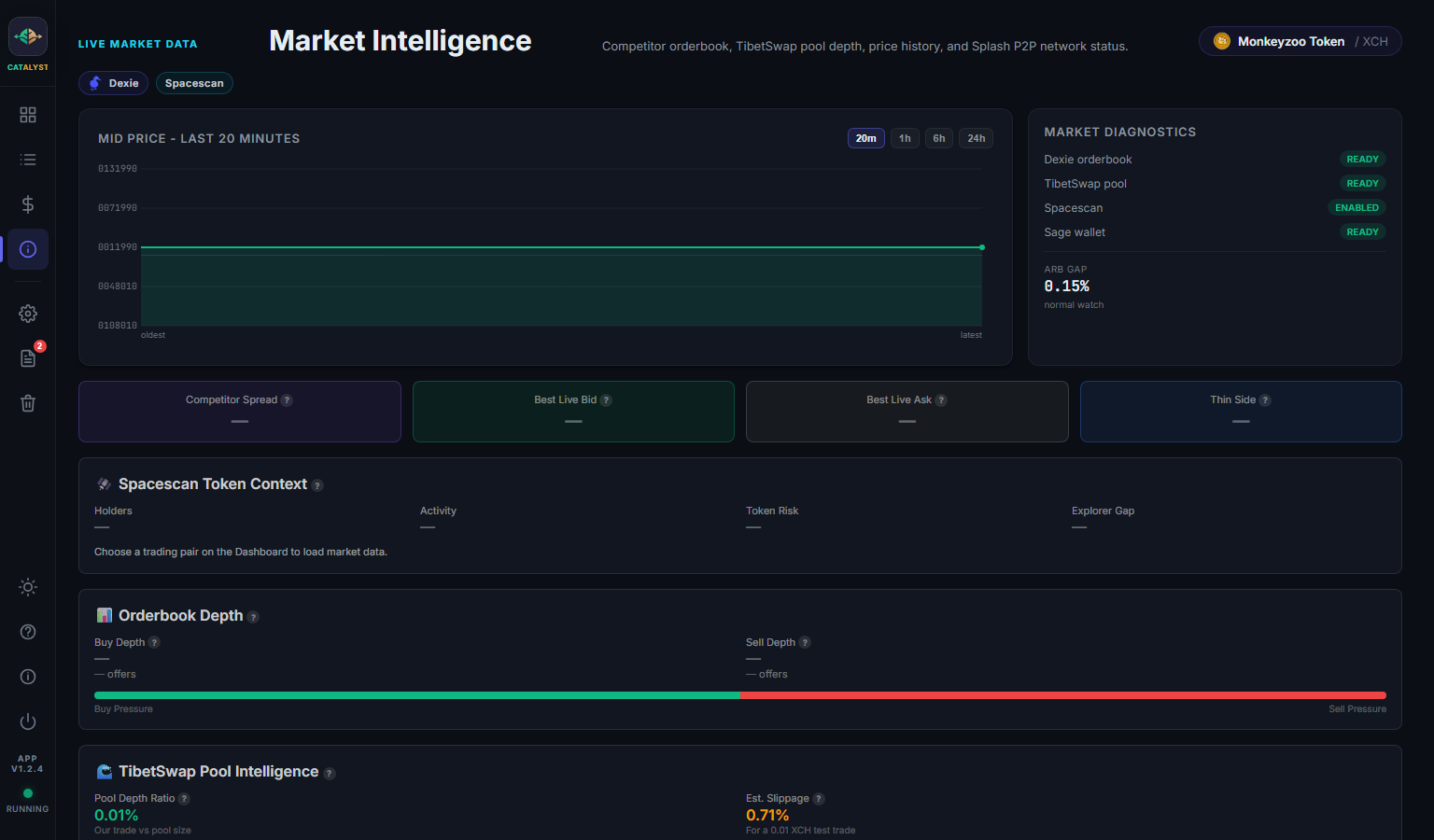
Market Intel view: competitor orderbook, pool depth, Spacescan data
MARKET INTEL
Competitor and pool context in one place.

Orderbook depth, TibetSwap slippage, DBX rewards eligibility, Splash P2P broadcast counters.

What it does

Everything a CAT market maker needs.

Set it up once and it handles the rest every loop cycle: quoting, requoting, fills, coin prep, and risk.

📊
Tiered Bid/Ask Ladder
Buy and sell offers across four tiers, Inner, Mid, Outer, Extreme. Larger nearest mid, smaller out wide.
Auto-Requote
Cancels and replaces offers when price drifts past your threshold. Pre-emptive refresh within 5 minutes of expiry.
🧠
Smart Settings
Reads your wallet balance and current market and proposes a sensible starting config, sizes, spread, tiers.
🔭
Mempool Fill Detection
Watches Coinset's mempool every 5 seconds for fills on your offers, replacements go up before chain confirmation.
🎯
Arb Sniper
Fires probe pairs when Dexie and TibetSwap diverge. Inventory-aware, cooled-down, and uses a dedicated coin pool.
🧭
Close the Gap
Adaptive spread-tightening probes that find the safest edge above the arb floor, then plant a real inner-tier offer there.
📈
Round-Trip PnL
Matches buys with sells of similar size. Tracks realised profit, win rate, average trip time, and unmatched legs.
🪙
Adaptive Coin Prep
Pre-splits coins to offer-sized denominations, then tops up automatically based on busy/normal/slow trading pace.
🛡️
Risk Controls
Position circuit breakers, reserve floors, mass-disappearance guard, price-shock detection, and per-side controls that keep the correcting side running.
📡
Market Intelligence
Competitor spreads on Dexie, TibetSwap pool depth and slippage, Spacescan token health, DBX reward eligibility.
↔️
Single & Two-Sided Modes
Run a normal two-sided book or a one-sided accumulate/distribute strategy with parked-state fuel tracking.
🖥️
Native Desktop App
Runs from the system tray with live status, light/dark themes, in-app crash reports, and update notifications.
🔗
Sage Wallet Integration
Local RPC on port 9257. Your keys never leave Sage, CATalyst just signs offers through it.
📡
Splash P2P Broadcast
Optional decentralised peer broadcast for wider visibility beyond Dexie. Inbound peer offer counters too.
The ladder

Four tiers, weighted toward mid.

Closer offers are larger because they're more likely to fill. Wider offers are smaller, they exist to catch dislocations and hold the shape of your book. Tiered sizing is on by default; you can tune the size per tier in Settings → Setup.

INNER 1.00 ×
MID 0.78 ×
OUTER 0.56 ×
EXTREME 0.32 ×
The loop

A steady loop, with fast watchers between cycles.

The main loop defaults to 90 seconds, while TibetSwap, AMM, and Coinset watchers can wake it early when fills or price shocks appear.

01
Fetch prices
Mid-price from Dexie + TibetSwap, plus arb-gap measurement and competitor spread.
02
Detect fills
Compare offers cycle-over-cycle; mempool watcher flags fills before chain confirmation.
03
Match round trips
Pair buy and sell fills into completed trades for realised PnL. Open legs surface on the P&L tab.
04
Quote & requote
Emergency requote on price shocks, normal requote past your drift threshold, otherwise just refresh expirers.
05
Snipe & tighten
Arb Sniper fires probes if the gap is wide. Close the Gap tightens toward the floor when enabled.
06
Top up coins
Adaptive coin prep checks spare coins per side and splits more in the background as needed.
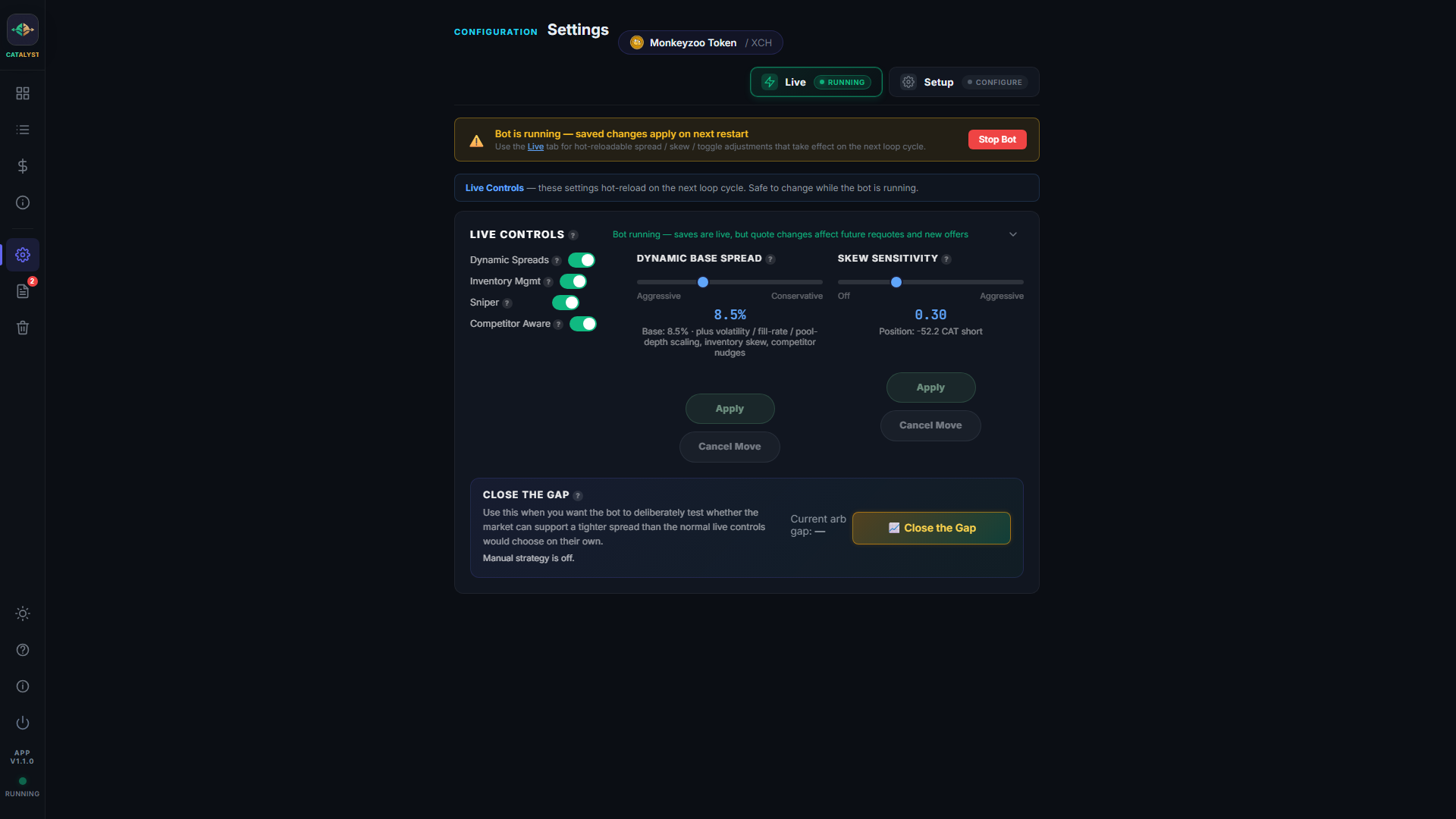
Settings → Live: hot-reloadable controls for spread, skew, and feature toggles
Before you start

Requirements

Nothing exotic. If you're already running Sage, you're 90% there.

🖥️
Windows 10 or 11
64-bit tested build · macOS/Linux experimental
👛
Sage Wallet
Latest stable · RPC enabled
🌿
Chia CAT tokens
In Sage · listed on Dexie
💎
XCH balance
For buy offers + transaction fees
Get started

Download CATalyst

Free to use. No account required. Your keys stay on your machine.

CATalyst
Download for Windows

The latest Windows installer is available from the official CATalyst public GitHub release channel. macOS and Linux remain experimental for now.

🪟 Windows Stable
Windows 10/11 · 64-bit installer · 23.4 MB
🍎 macOS Experimental
Apple Silicon & Intel · Not fully tested · Coming soon
🐧 Linux Experimental
Linux archive · Not fully tested · Coming soon
Latest Windows build
CATalyst v1.2.28
v1.2.28
Stable - published 13 May 2026 - windows download available
What changed recently
  • Move beta feedback intake to bot repo
  • handle crtl-c exit
  • Fix desktop update notification bridge

The Windows installer is hosted on the public CATalyst GitHub release channel. This button points only to the signed public release asset.

Beta testers wanted

Use small amounts while testing. If CATalyst crashes, behaves oddly, or the setup flow is confusing, please tell us through the public bot repo issue forms. Include the version shown above and, if useful, attach the Logs tab Debug Bundle zip. Debug Bundles are redacted by default, but reports are public, so review anything you attach.

Installer
Catalyst-Setup-v1.2.28.exe
SHA-256
7e87adc6813e4bf97f800da54690c000a8cda0258c57b8454dc6543ac530d57b
Safe download rules
  • Public installers link only to official CATalyst GitHub Releases over HTTPS.
  • Each download shows its version, release notes, file size, and SHA-256 checksum.
  • There will be no mirror links, shortened URLs, or installer links posted only in chat.
  • Bug reports and feedback go through the public bot repo during beta testing.
  • CATalyst never asks for your seed phrase or private keys; Sage signs locally on your machine.
Installation

Setup guide

About ten minutes if Sage is already installed. The full version of every step lives in the docs.

1
Install Sage Wallet
Install the latest stable release of Sage Wallet. Let it sync, then go to Settings → Advanced and turn on RPC. CATalyst uses this to talk to Sage on port 9257.
2
Add your CAT and fund the wallet
Add the CAT you want to trade in Sage's token manager. You'll need a balance of that CAT and some XCH, one for sells, the other for buys and fees.
3
Download and run CATalyst
Use the Windows download above to install CATalyst from the public GitHub release channel. On first launch it checks Sage is reachable and walks you through connecting.
4
Pick your trading pair
Use the pair selector at the top of the dashboard to choose your CAT / XCH pair. CATalyst pulls the live price from TibetSwap and the orderbook from Dexie.
5
Run Smart Settings
In Settings → Setup, click Smart Settings. It reads your balances and the live market, then proposes sizes, spread, and tier weights. Apply if the numbers look sensible, you can fine-tune anything afterwards.
6
Coin prep, then Start Bot
Click Prepare Coins to split your wallet into offer-sized UTXOs (a few minutes the first time). Then hit Start Bot. The dashboard switches to live mode and the ladder goes up.
Tip: close the window and CATalyst keeps running from the system tray. Re-open it any time to inspect the session.
Optional enhancement
Spacescan API key

CATalyst works without a Spacescan key, but an API key improves token-health context, holder/activity data, and Smart Settings risk estimates. Live quote pricing still comes from Dexie and TibetSwap.

Token icons and basic data Holder and activity panels On-chain risk context Better Smart Settings inputs
View Spacescan APIs
Risk disclosure

CATalyst is beta software for advanced users. It places real offers using real funds in your Sage wallet. Bugs, edge cases, and adverse market conditions can cause losses, including filling at unfavourable prices, getting stuck on one side of an inventory limit, or having open offers cancelled mid-trade.

Nothing in this app or on this site constitutes financial advice. Use only with capital you can afford to lose. CATalyst is provided as-is, with no warranty, support obligation, or guarantee of profit. You are responsible for your own trading decisions, tax reporting, and operational security.

Read the Troubleshooting section before running for the first time. Start with small trade sizes and a wide spread until you understand how the bot behaves with your specific CAT pair.